When to use the Payment Reminder
A payment reminder nudges a customer who has not paid yet. Freelancers, landlords, clubs and small suppliers write these every month, and most are awkward to word. This one is set up as a short letter. It opens politely, shows the invoice number, the amount due and the due date, and invites a reply. Because you fill in a form, each reminder takes a minute, and the tone stays the same.
Questions to ask in your form
Create these questions in your Google Form. The PDF is built from the questions you ask, so rename, add or drop any of them.
- Customer email Short answerWhere the reminder is sent. Choose it as the recipient.
- Customer name Short answerOptional, for your own records.
- Invoice number Short answerFor example 'INV-2041'.
- Amount due Short answerInclude the currency.
- Due date DateThe original due date.
- Extra note ParagraphOptional, such as how to pay.
What the PDF contains
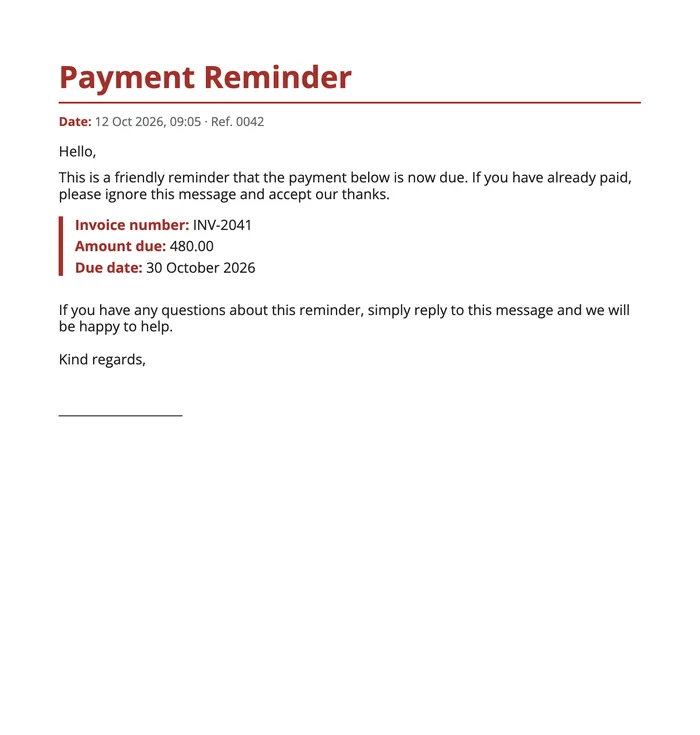
A one-page letter with a red heading 'Payment Reminder', a date and a reference. It opens with 'Hello,' and a friendly reminder that the payment below is now due, with a thank-you if it has already been paid. A shaded block lists the invoice number, amount due and due date. It closes with an offer to help and 'Kind regards,'.
Set it up in three steps
- Install the add-on. Add FairSign Forms to PDF to Google Forms from the Google Workspace Marketplace. It is free to install.
- Pick this template. Open your form, click the puzzle-piece icon (or the three-dot menu, then Add-ons), and open FairSign Forms to PDF. In step 1, choose Payment Reminder from the template library. It opens as a Google Doc in your Drive.
- Turn on sending. Tell the add-on which question holds the email address, send a test to yourself, then switch on automatic sending. Each new response is turned into a PDF and emailed to the person.
Tips for the Payment Reminder
- Send it a few days after the due date, not before. An early reminder can read as an accusation.
- Attach or link the original invoice by email, since this PDF does not repeat the item list.
- Keep a record of reminders sent. The response sheet is your log, with a date and time for each one.
Note. This template is not legal or tax advice. Invoice rules, tax numbers and wording differ by country. Check what applies to you before you send an invoice.
Questions people ask
Is this a legal demand?
No. It is a polite reminder. Formal demands follow your country's rules and may need advice.
Can I make the tone firmer?
Yes. Edit the wording in the Google Doc, for example for a second or final reminder.
Can I edit the Payment Reminder before I use it?
Yes. Choosing it in the add-on creates a Google Doc in your Drive. Change the wording, fonts or colours, add a logo, and keep the {{placeholders}} in double braces where answers should appear.