When to use the Purchase Order
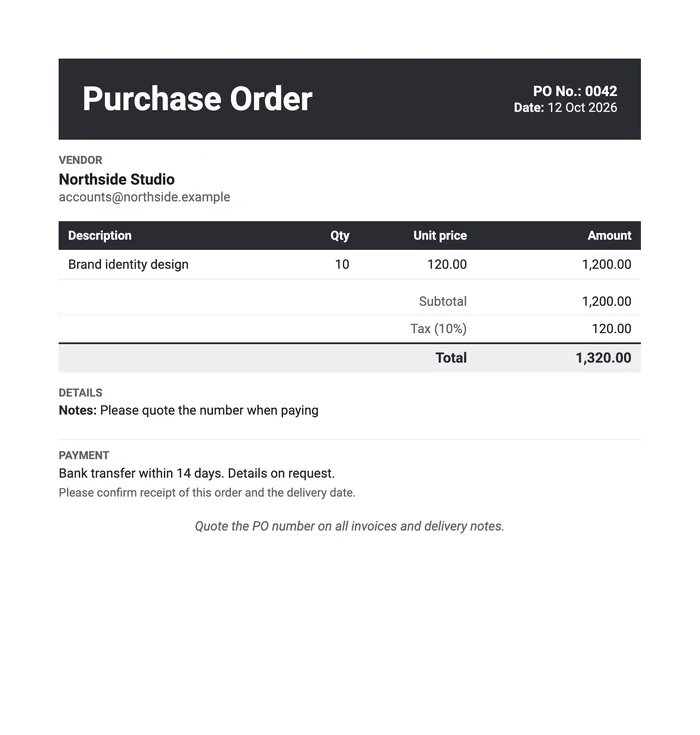
A purchase order is what a buyer sends a supplier to say 'I want these items at this price'. Small businesses, clubs, schools and project teams use them to keep spending organised, and suppliers often ask for a PO number before they will ship. An internal form lets staff request an order, and the PDF that comes out is ready to forward to the supplier. The page has a dark charcoal header and the PO number at the top right.
Questions to ask in your form
Create these questions in your Google Form. The PDF is built from the questions you ask, so rename, add or drop any of them.
- Vendor name Short answerPrinted in the 'Vendor' block.
- Vendor email Short answerPrinted, and can be chosen as the address the PDF is sent to.
- Item description Short answerWhat you want to buy.
- Quantity Short answerA number.
- Agreed unit price Short answerA number. Used to work out the total.
- Delivery address and date ParagraphOptional. Goes into the notes.
What the PDF contains
A charcoal banner headed 'Purchase Order' with the PO number and date. The vendor block is followed by a table of description, quantity, unit price and amount, then subtotal, tax and total. At the foot, 'Please confirm receipt of this order and the delivery date' and 'Quote the PO number on all invoices and delivery notes.'
Set it up in three steps
- Install the add-on. Add FairSign Forms to PDF to Google Forms from the Google Workspace Marketplace. It is free to install.
- Pick this template. Open your form, click the puzzle-piece icon (or the three-dot menu, then Add-ons), and open FairSign Forms to PDF. In step 1, choose Purchase Order from the template library. It opens as a Google Doc in your Drive.
- Turn on sending. Tell the add-on which question holds the email address, send a test to yourself, then switch on automatic sending. Each new response is turned into a PDF and emailed to the person.
Tips for the Purchase Order
- Choose the vendor email question as the recipient and turn on 'Also CC me' in the add-on, so the supplier gets the PO and you keep a copy.
- Approvals matter. A purchase order is a commitment to spend. Decide who may submit the form, for example by limiting it to your organisation.
- Ask for the cost centre or project code as an extra question, and it prints in the notes.
Note. This template is not legal or tax advice. Invoice rules, tax numbers and wording differ by country. Check what applies to you before you send an invoice.
Questions people ask
Does the PDF carry a PO number?
Yes. Each response gets a reference number, shown as the PO number, so you can quote it on invoices.
Can it record approval from a manager?
Not on its own. Ask for the approver's name in the form, or print and sign the page.
Can I edit the Purchase Order before I use it?
Yes. Choosing it in the add-on creates a Google Doc in your Drive. Change the wording, fonts or colours, add a logo, and keep the {{placeholders}} in double braces where answers should appear.