When to use the Payment Voucher
A payment voucher is an internal record that an outgoing payment was approved and made. Small businesses, clubs, churches and charities use it when they pay a supplier, a contractor or a volunteer expense. A form lets the person who pays fill in the details once, and the PDF gives treasurers and accountants a clean record for the files. The page has lines for a signature and an approver.
Questions to ask in your form
Create these questions in your Google Form. The PDF is built from the questions you ask, so rename, add or drop any of them.
- Payee name Short answerWho received the money.
- Your email Short answerWhere the voucher is sent. Often the person filing it.
- Purpose of payment Short answerFor example 'Photography services, invoice 118'.
- Paid by DropdownBank transfer, cheque or cash.
- Amount paid Short answerName it Amount to show it as the bold 'Amount paid' row.
- Approved by Short answerOptional. Typed name of the approver.
What the PDF contains
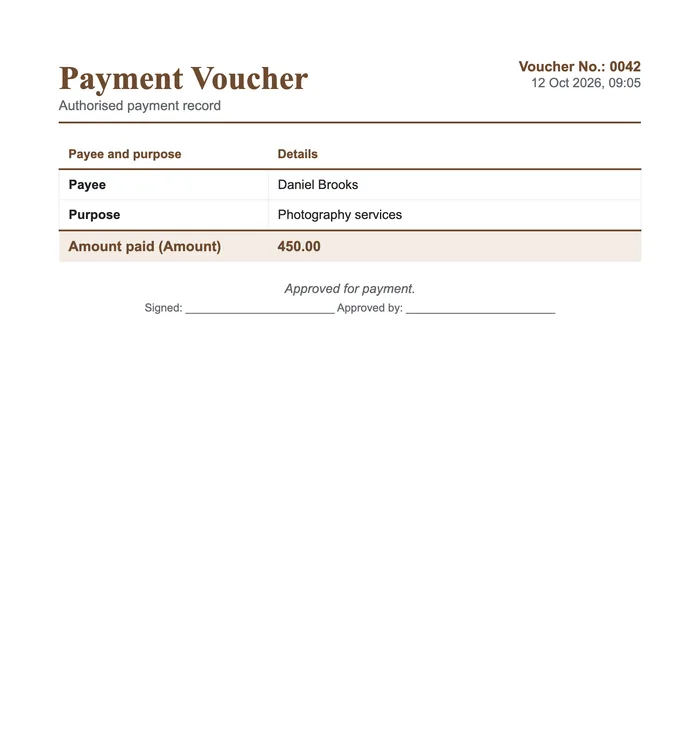
A page headed 'Payment Voucher' with 'Authorised payment record'. The voucher number and time sit at the top right. A boxed table lists the payee, the purpose and the other answers, with the amount paid in the final shaded row. At the bottom, 'Approved for payment' is followed by blank lines for a signature and for the approver.
Set it up in three steps
- Install the add-on. Add FairSign Forms to PDF to Google Forms from the Google Workspace Marketplace. It is free to install.
- Pick this template. Open your form, click the puzzle-piece icon (or the three-dot menu, then Add-ons), and open FairSign Forms to PDF. In step 1, choose Payment Voucher from the template library. It opens as a Google Doc in your Drive.
- Turn on sending. Tell the add-on which question holds the email address, send a test to yourself, then switch on automatic sending. Each new response is turned into a PDF and emailed to the person.
Tips for the Payment Voucher
- Attach supplier invoices separately and write the invoice number in the purpose answer, so the voucher and the invoice can be matched.
- Printed signature lines are blank. If you need an approval, print the page and sign it, or keep a typed approver name in the form.
- Use one voucher per payment. Combining several invoices in one voucher makes reconciling harder.
Note. This template is not legal or tax advice. Rules for receipts, record keeping and tax differ by country. Check what applies to you before you rely on a receipt.
Questions people ask
Does this make the payment?
No. It records a payment you have made through your bank or cash box.
Is it the same as an invoice?
No. An invoice is a request for payment. A voucher is a record that you paid.
Can I edit the Payment Voucher before I use it?
Yes. Choosing it in the add-on creates a Google Doc in your Drive. Change the wording, fonts or colours, add a logo, and keep the {{placeholders}} in double braces where answers should appear.