When to use the Sales Receipt
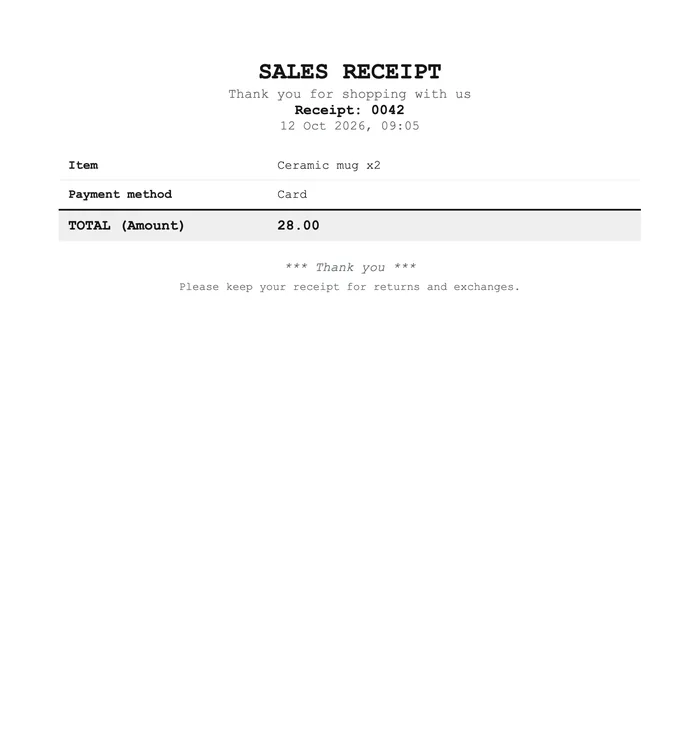
A sales receipt is the slip you hand over when someone buys something. Market stall holders, pop-up shops, craft sellers and small cafes use a form on a tablet or phone to record the sale and email a receipt to the customer. The layout copies a till roll, in a typewriter face, so customers recognise it at a glance. It suits low-value sales where an invoice would be too much.
Questions to ask in your form
Create these questions in your Google Form. The PDF is built from the questions you ask, so rename, add or drop any of them.
- Item Short answerFor example 'Ceramic mug x2'.
- Customer email Short answerWhere the receipt is sent.
- Payment method DropdownCash, card or transfer.
- Amount Short answerName it Amount. It appears as 'TOTAL' in capitals.
- Sale date DateOptional. The submission time is printed anyway.
What the PDF contains
A centred, monospaced page that starts with 'SALES RECEIPT' and 'Thank you for shopping with us', then the receipt number and the submission time. Item and payment method come next in short lines, with a heavy rule and the TOTAL in capitals. The footer reads '*** Thank you ***' and reminds buyers to keep the receipt for returns.
Set it up in three steps
- Install the add-on. Add FairSign Forms to PDF to Google Forms from the Google Workspace Marketplace. It is free to install.
- Pick this template. Open your form, click the puzzle-piece icon (or the three-dot menu, then Add-ons), and open FairSign Forms to PDF. In step 1, choose Sales Receipt from the template library. It opens as a Google Doc in your Drive.
- Turn on sending. Tell the add-on which question holds the email address, send a test to yourself, then switch on automatic sending. Each new response is turned into a PDF and emailed to the person.
Tips for the Sales Receipt
- Add a shortcut to the form on your phone's home screen, so you can record a sale in seconds.
- One item line per response keeps the receipt simple. For multi-item orders, write items in one answer, separated by commas.
- Know your tax rules. A receipt layout does not add sales tax, so include any tax in the amount you type.
Note. This template is not legal or tax advice. Rules for receipts, record keeping and tax differ by country. Check what applies to you before you rely on a receipt.
Questions people ask
Can I print a receipt on a thermal printer?
The PDF is a normal page. You can print it on a standard printer, or save it and send it by email, which is what the add-on does.
Does it work offline?
No. The form needs a connection, and the PDF is emailed after submission.
Can I edit the Sales Receipt before I use it?
Yes. Choosing it in the add-on creates a Google Doc in your Drive. Change the wording, fonts or colours, add a logo, and keep the {{placeholders}} in double braces where answers should appear.