When to use the Absence Note
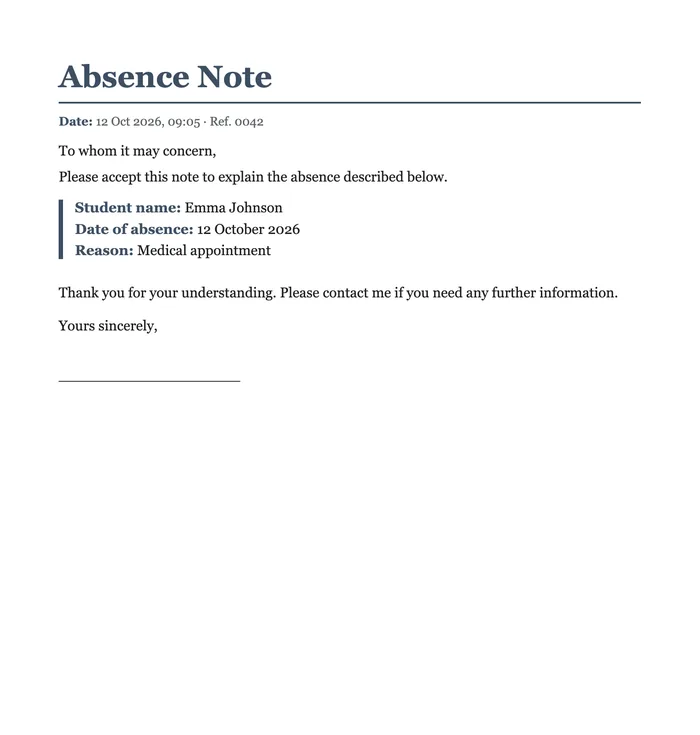
An absence note explains why a student was not in school or class. Parents and older students write them, and school offices file them. A form makes it quick to send the reason from a phone on the same morning, and the PDF reads like a short letter that can be filed or printed. The serif letter layout starts 'To whom it may concern,' and ends 'Yours sincerely,'.
Questions to ask in your form
Create these questions in your Google Form. The PDF is built from the questions you ask, so rename, add or drop any of them.
- Student name Short answerFirst row of the details block.
- Your email Short answerWhere the parent's copy is sent.
- Class or year group DropdownOptional.
- Date of absence DateShown in the details block.
- Reason Short answerFor example 'Medical appointment'.
- Parent or guardian name Short answerOptional.
What the PDF contains
A one-page letter with a date and a note reference under a rule. It opens 'To whom it may concern,' and 'Please accept this note to explain the absence described below.' A block with a bar down the left lists the answers. It closes 'Thank you for your understanding. Please contact me if you need any further information.' with 'Yours sincerely,' and a blank line for a signature.
Set it up in three steps
- Install the add-on. Add FairSign Forms to PDF to Google Forms from the Google Workspace Marketplace. It is free to install.
- Pick this template. Open your form, click the puzzle-piece icon (or the three-dot menu, then Add-ons), and open FairSign Forms to PDF. In step 1, choose Absence Note from the template library. It opens as a Google Doc in your Drive.
- Turn on sending. Tell the add-on which question holds the email address, send a test to yourself, then switch on automatic sending. Each new response is turned into a PDF and emailed to the person.
Tips for the Absence Note
- Keep the reason short and factual. A school does not need medical detail unless it asks for it.
- Send the PDF to the school office as well as the parent. Choose the school's address as the recipient, or turn on 'Also CC me'.
- A signature line is printed, so a signed copy needs a pen. Many schools accept an emailed note as it is.
Note. This template is not legal advice. Whether a school accepts an emailed note, and how long absences must be documented, depends on the school and the local rules.
Questions people ask
Does a school have to accept it?
That depends on the school's policy. The note is a record of what the parent said.
Can it cover several days?
Yes. Ask for the dates in a short answer, such as '3 to 5 March'.
Can I edit the Absence Note before I use it?
Yes. Choosing it in the add-on creates a Google Doc in your Drive. Change the wording, fonts or colours, add a logo, and keep the {{placeholders}} in double braces where answers should appear.