When to use the Scholarship Application
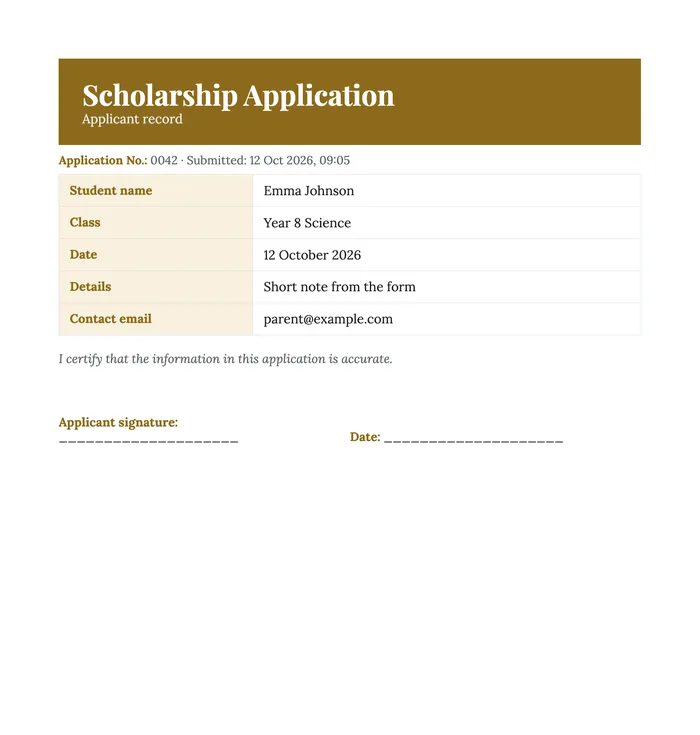
A scholarship application summary prints each applicant's answers on a page that a committee can read, annotate and file. Schools, charities, community foundations, clubs and alumni groups use it to keep applications uniform. Applicants get a copy for their records. The gold-brown banner reads 'Scholarship Application' and 'Applicant record', and the page ends with a statement that the information is accurate and a line to sign.
Questions to ask in your form
Create these questions in your Google Form. The PDF is built from the questions you ask, so rename, add or drop any of them.
- Applicant name Short answerFirst row.
- Email address Short answerWhere the copy is sent.
- School or programme Short answerWhere they study or plan to.
- Which award are you applying for? DropdownOne option per award.
- Personal statement ParagraphSet a clear length in the question.
- Link to supporting documents Short answerA shared folder link.
What the PDF contains
A gold-brown banner headed 'Scholarship Application' with 'Applicant record' and an application number with the submission time. A table with shaded labels lists every answer. Under it, 'I certify that the information in this application is accurate.' with blank lines for the applicant signature and the date.
Set it up in three steps
- Install the add-on. Add FairSign Forms to PDF to Google Forms from the Google Workspace Marketplace. It is free to install.
- Pick this template. Open your form, click the puzzle-piece icon (or the three-dot menu, then Add-ons), and open FairSign Forms to PDF. In step 1, choose Scholarship Application from the template library. It opens as a Google Doc in your Drive.
- Turn on sending. Tell the add-on which question holds the email address, send a test to yourself, then switch on automatic sending. Each new response is turned into a PDF and emailed to the person.
Tips for the Scholarship Application
- Put the deadline in the form description, and turn off 'Accepting responses' in the form when it passes, so late applications do not slip in.
- Treat applications as private. Share the response sheet only with committee members.
- A long personal statement can push the page count up. Say a word limit in the question text.
- Say in the form description how winners will be told and roughly when. Applicants stop emailing to ask once they know what to expect.
Note. This template is not legal advice. School and consent rules differ by country and by school. Check your own policy.
Questions people ask
Can the committee score applications?
Not inside the PDF. Add scores to the response sheet, or print the pages and mark them.
Does it attach transcripts?
No. Ask for a link to the documents instead.
Can I edit the Scholarship Application before I use it?
Yes. Choosing it in the add-on creates a Google Doc in your Drive. Change the wording, fonts or colours, add a logo, and keep the {{placeholders}} in double braces where answers should appear.