When to use the Permission Slip
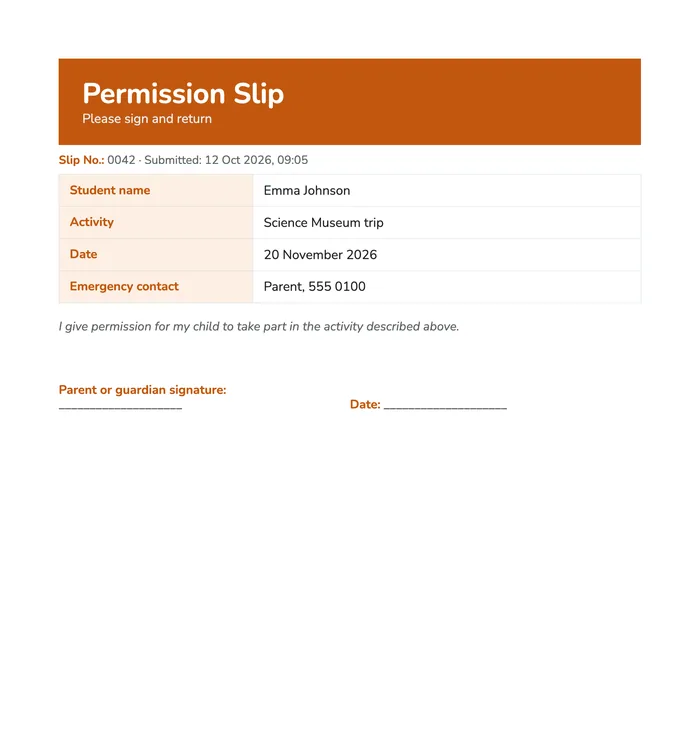
A permission slip asks a parent or guardian to agree to something a child will do: a field trip, a photo release, a sports fixture, a sleepover. Teachers, scout leaders, coaches and club organisers use it. A form makes the request easy to answer from a phone, and the PDF gives each family a copy and each organiser a record. The orange banner reads 'Permission Slip' and 'Please sign and return'.
Questions to ask in your form
Create these questions in your Google Form. The PDF is built from the questions you ask, so rename, add or drop any of them.
- Student name Short answerFirst row.
- Parent or guardian name Short answerTyped name of the person giving permission.
- Parent or guardian email Short answerWhere the copy is sent.
- Activity DropdownFor example 'Science Museum trip'.
- Emergency contact Short answerName and phone number.
- I give permission for my child to take part CheckboxesMake it required, so the form cannot be sent without it.
What the PDF contains
An orange banner headed 'Permission Slip' with 'Please sign and return' and a slip number with the submission time. A table with shaded labels lists the answers. Under it, 'I give permission for my child to take part in the activity described above.' and blank lines for 'Parent or guardian signature' and the date.
Set it up in three steps
- Install the add-on. Add FairSign Forms to PDF to Google Forms from the Google Workspace Marketplace. It is free to install.
- Pick this template. Open your form, click the puzzle-piece icon (or the three-dot menu, then Add-ons), and open FairSign Forms to PDF. In step 1, choose Permission Slip from the template library. It opens as a Google Doc in your Drive.
- Turn on sending. Tell the add-on which question holds the email address, send a test to yourself, then switch on automatic sending. Each new response is turned into a PDF and emailed to the person.
Tips for the Permission Slip
- Decide what counts as permission. A typed name and a ticked box is a record of consent, but FairSign does not collect an electronic signature. If your school wants a pen signature, print the page, sign it and return it.
- Say exactly what the child is agreeing to, with date, place and cost. A vague activity name is a weak permission.
- Collect an emergency contact and any medical needs in the same form, so staff have them on the day.
Note. This template is not legal advice. Whether a form, a typed name or a signed page counts as valid consent depends on your school, your organisation and your country. Check your own policy.
Questions people ask
Is a ticked box enough permission?
That depends on your school or organisation. Many accept it, some insist on a signature. Check your policy.
Does the parent sign on screen?
No. The signature line is blank for a pen. The form records a typed name and a checkbox.
Can I edit the Permission Slip before I use it?
Yes. Choosing it in the add-on creates a Google Doc in your Drive. Change the wording, fonts or colours, add a logo, and keep the {{placeholders}} in double braces where answers should appear.