When to use the Leave Request
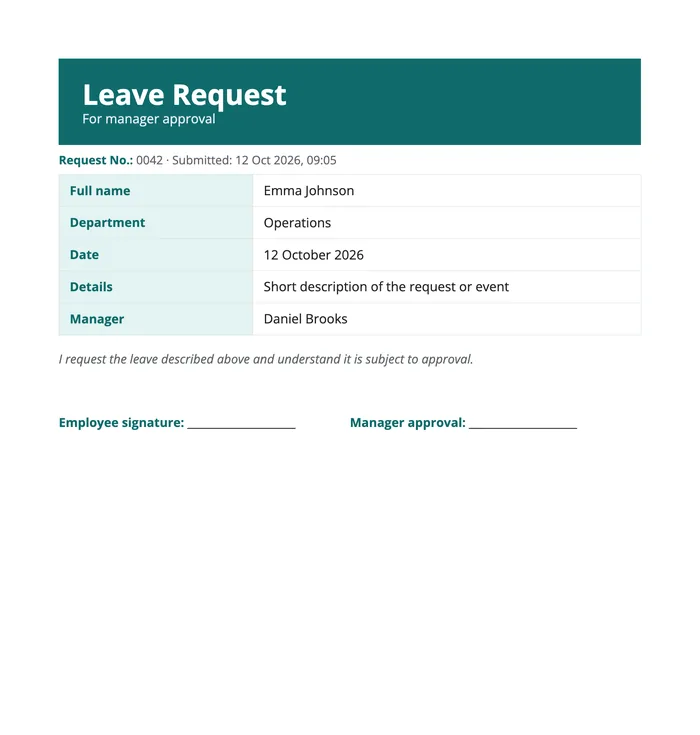
A leave request records that someone has asked for holiday, sick leave or other time off. Small businesses, schools, clinics and clubs use it to replace requests that arrive in chat messages and get lost. The teal banner reads 'Leave Request' and 'For manager approval'. The employee gets a copy, and the manager gets something to approve and file. It records a request. It does not check balances or sign off the leave.
Questions to ask in your form
Create these questions in your Google Form. The PDF is built from the questions you ask, so rename, add or drop any of them.
- Full name Short answerFirst row.
- Work email Short answerWhere the copy is sent.
- Type of leave DropdownAnnual leave, sick leave, unpaid, other.
- First day away DateStart of the leave.
- Last day away DateEnd of the leave.
- Manager Short answerOptional. Who should approve.
What the PDF contains
A teal banner headed 'Leave Request' with 'For manager approval' under it. A table with shaded labels lists your answers, with a request number and a time. Below it the statement 'I request the leave described above and understand it is subject to approval.' is followed by blank lines for the employee signature and the manager approval.
Set it up in three steps
- Install the add-on. Add FairSign Forms to PDF to Google Forms from the Google Workspace Marketplace. It is free to install.
- Pick this template. Open your form, click the puzzle-piece icon (or the three-dot menu, then Add-ons), and open FairSign Forms to PDF. In step 1, choose Leave Request from the template library. It opens as a Google Doc in your Drive.
- Turn on sending. Tell the add-on which question holds the email address, send a test to yourself, then switch on automatic sending. Each new response is turned into a PDF and emailed to the person.
Tips for the Leave Request
- Turn on 'Also CC me' in the add-on, or have the manager's email as the recipient, so approvals do not depend on the employee forwarding the PDF.
- Approval is by pen. The manager prints and signs, or replies by email. FairSign does not collect approvals.
- Leave rules differ by country and contract. Use the form for the request only, and apply your own policy to the decision.
Note. This template is not legal or HR advice. Employment, safety and data protection rules differ by country. Check what applies to you.
Questions people ask
Does it track leave balances?
No. It records each request as a PDF. Balances stay in your own system or spreadsheet.
Can I use it for sick notes?
You can collect a sick leave request. Some places require a medical certificate, which this does not replace.
Can I edit the Leave Request before I use it?
Yes. Choosing it in the add-on creates a Google Doc in your Drive. Change the wording, fonts or colours, add a logo, and keep the {{placeholders}} in double braces where answers should appear.