When to use the Admission Ticket
An admission ticket is a confirmation shaped like a ticket, with a bold number on a coloured strip. Small theatres, school plays, talks, workshops and charity dinners use it so each guest has a unique reference to show on a phone or on paper. The form is the booking, and the PDF is the ticket. The template has no barcode or QR code, so it works when you check names against a list, not when you scan at the door.
Questions to ask in your form
Create these questions in your Google Form. The PDF is built from the questions you ask, so rename, add or drop any of them.
- Full name Short answerFirst row.
- Email address Short answerWhere the ticket is sent.
- Event or show DropdownA dropdown helps when you run several nights.
- Date and time DropdownList every showing.
- Number of seats Short answerA number. Make it required.
- Seating or access needs ParagraphOptional.
What the PDF contains
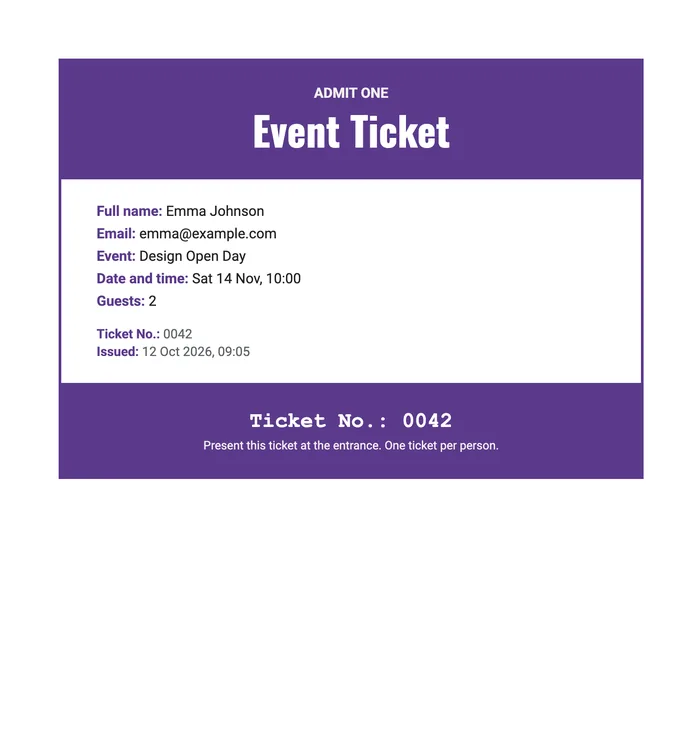
A purple banner with the label 'Admit one' and the title 'Event Ticket'. Every answer is a label and value line. The ticket number and the issue time follow, and a deep purple strip at the bottom shows the ticket number in a typewriter face, with the instructions 'Present this ticket at the entrance. One ticket per person.'
Set it up in three steps
- Install the add-on. Add FairSign Forms to PDF to Google Forms from the Google Workspace Marketplace. It is free to install.
- Pick this template. Open your form, click the puzzle-piece icon (or the three-dot menu, then Add-ons), and open FairSign Forms to PDF. In step 1, choose Admission Ticket from the template library. It opens as a Google Doc in your Drive.
- Turn on sending. Tell the add-on which question holds the email address, send a test to yourself, then switch on automatic sending. Each new response is turned into a PDF and emailed to the person.
Tips for the Admission Ticket
- The ticket number is a reference, not a secure code. Check names against your response sheet at the door.
- The page says 'one ticket per person'. If a booking covers four seats, either collect four names or edit the sentence in the Doc.
- FairSign does not take payment. Charge for tickets elsewhere, and send the form link only to people who have paid.
Questions people ask
Can it scan at the entrance?
No. There is no barcode or QR code. Check the ticket number or name against your list.
Can tickets be resold?
A PDF can be forwarded, as any email can. Check names at the door if that matters.
Can I edit the Admission Ticket before I use it?
Yes. Choosing it in the add-on creates a Google Doc in your Drive. Change the wording, fonts or colours, add a logo, and keep the {{placeholders}} in double braces where answers should appear.