When to use the Assignment Receipt
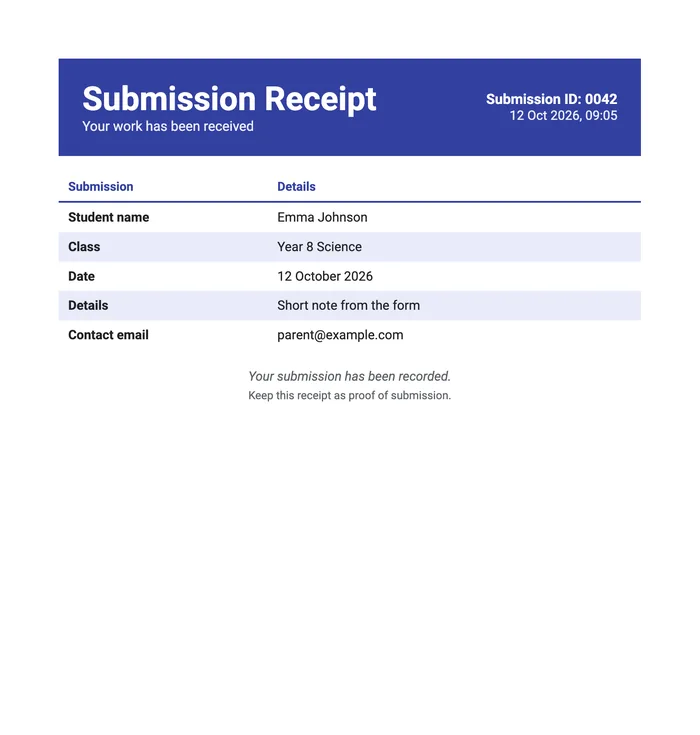
An assignment receipt tells a student their work has arrived, with a reference and a time. Teachers and lecturers who collect work by form or by link use it so that arguments about whether something was submitted on time are settled by a record. It suits short tasks, portfolios and coursework where students share a link to their file. The indigo banner reads 'Submission Receipt' and 'Your work has been received'.
Questions to ask in your form
Create these questions in your Google Form. The PDF is built from the questions you ask, so rename, add or drop any of them.
- Student name Short answerFirst row.
- Student email Short answerWhere the receipt is sent.
- Class or module DropdownOne option per class.
- Assignment title Short answerOr a dropdown for fixed assignments.
- Link to the work Short answerA shared Google Drive or document link.
- Comments for the teacher ParagraphOptional.
What the PDF contains
An indigo banner headed 'Submission Receipt' with 'Your work has been received' and a submission ID with the time at the top right. A table with shaded rows lists the answers. It ends with 'Your submission has been recorded.' and a reminder to keep the receipt as proof of submission.
Set it up in three steps
- Install the add-on. Add FairSign Forms to PDF to Google Forms from the Google Workspace Marketplace. It is free to install.
- Pick this template. Open your form, click the puzzle-piece icon (or the three-dot menu, then Add-ons), and open FairSign Forms to PDF. In step 1, choose Assignment Receipt from the template library. It opens as a Google Doc in your Drive.
- Turn on sending. Tell the add-on which question holds the email address, send a test to yourself, then switch on automatic sending. Each new response is turned into a PDF and emailed to the person.
Tips for the Assignment Receipt
- The receipt shows the time the form was submitted. Say in the form that this is the time you will go by, so nobody argues about the clock.
- Ask for a share link, and check it opens for you. The PDF records the link text, not the file.
- A receipt proves submission, not quality or receipt of every file. Say what you will check, such as the link working.
Questions people ask
Can students upload files in the form?
File upload questions exist in Google Forms, but FairSign shows answers, not files. A link is the reliable choice.
Can I use it for job tasks as well?
Yes. Any hand-in with a name, a title and a link fits.
Can I edit the Assignment Receipt before I use it?
Yes. Choosing it in the add-on creates a Google Doc in your Drive. Change the wording, fonts or colours, add a logo, and keep the {{placeholders}} in double braces where answers should appear.