When to use the Award of Excellence
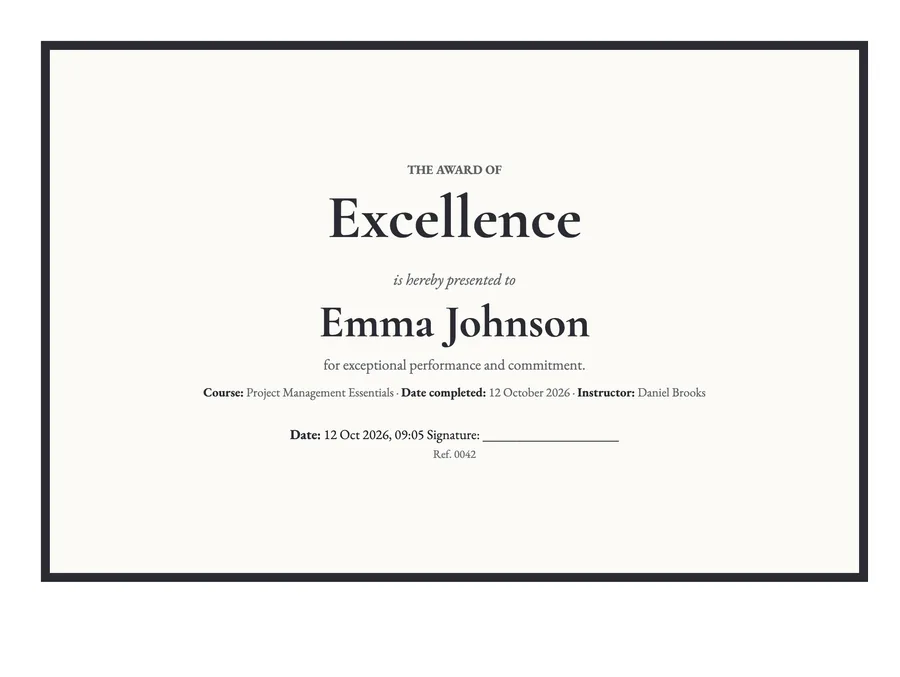
The Award of Excellence suits formal recognition: employee of the month, a yearly prize at a school, or the winner of a competition. The heading reads 'The award of' with the word Excellence below it in large type. Companies, schools and associations use it where a plain certificate feels too light. Because winners are usually few, you can collect nominations by form and generate each award once the decision is made.
Questions to ask in your form
Create these questions in your Google Form. The PDF is built from the questions you ask, so rename, add or drop any of them.
- Winner full name Short answerAppears under the heading in large type.
- Email address Short answerWhere the PDF should go.
- Award category DropdownFor example 'Team Player' or 'Customer Service'.
- Year or period Short answerFor example '2027' or 'Q2'.
- Reason for the award ParagraphOne short sentence works best.
- Presented by Short answerOptional. Name and role.
What the PDF contains
A cream page with a bold black frame, the words 'The award of' and 'Excellence' in large serif type, and 'is hereby presented to' above the winner's name. A line about exceptional performance and commitment follows, then your extra answers, the date, a signature line and a reference number.
Set it up in three steps
- Install the add-on. Add FairSign Forms to PDF to Google Forms from the Google Workspace Marketplace. It is free to install.
- Pick this template. Open your form, click the puzzle-piece icon (or the three-dot menu, then Add-ons), and open FairSign Forms to PDF. In step 1, choose Award of Excellence from the template library. It opens as a Google Doc in your Drive.
- Turn on sending. Tell the add-on which question holds the email address, send a test to yourself, then switch on automatic sending. Each new response is turned into a PDF and emailed to the person.
Tips for the Award of Excellence
- Keep the award category in a dropdown so the wording is identical every year.
- Print on heavier paper if you can. A 120 gsm or 80 lb sheet makes the frame look like a proper award.
- Send the PDF to yourself first for review. In the add-on, send a test before turning on automatic sending.
Questions people ask
Is this suitable for employee recognition?
Yes. Many teams use it for monthly or annual awards. Ask for the name, category and reason, and send the PDF to the manager or the winner.
Can I add a company logo?
Yes. Open the Google Doc, insert your logo above the heading and save. Every new PDF includes it.
Can I edit the Award of Excellence before I use it?
Yes. Choosing it in the add-on creates a Google Doc in your Drive. Change the wording, fonts or colours, add a logo, and keep the {{placeholders}} in double braces where answers should appear.