When to use the Gift Certificate
A gift certificate lets someone give a class, a treatment or a shop credit without a physical card. Studios, salons, bakeries and clubs use a form so a buyer can fill in who it is for and what it is worth. The recipient sees a printable voucher with their name on it. This template does not take payment. It creates the voucher after you have been paid in whatever way you normally accept.
Questions to ask in your form
Create these questions in your Google Form. The PDF is built from the questions you ask, so rename, add or drop any of them.
- Recipient name Short answerShown large on the voucher.
- Email address Short answerWhere the voucher is sent. Can be the buyer, who then forwards it.
- Value or service Short answerFor example '$50 credit' or 'One 60-minute massage'.
- From Short answerThe buyer name, for the personal touch.
- Personal message ParagraphOptional. Shorter is better.
- Valid until DateOptional. Shown with the other details.
What the PDF contains
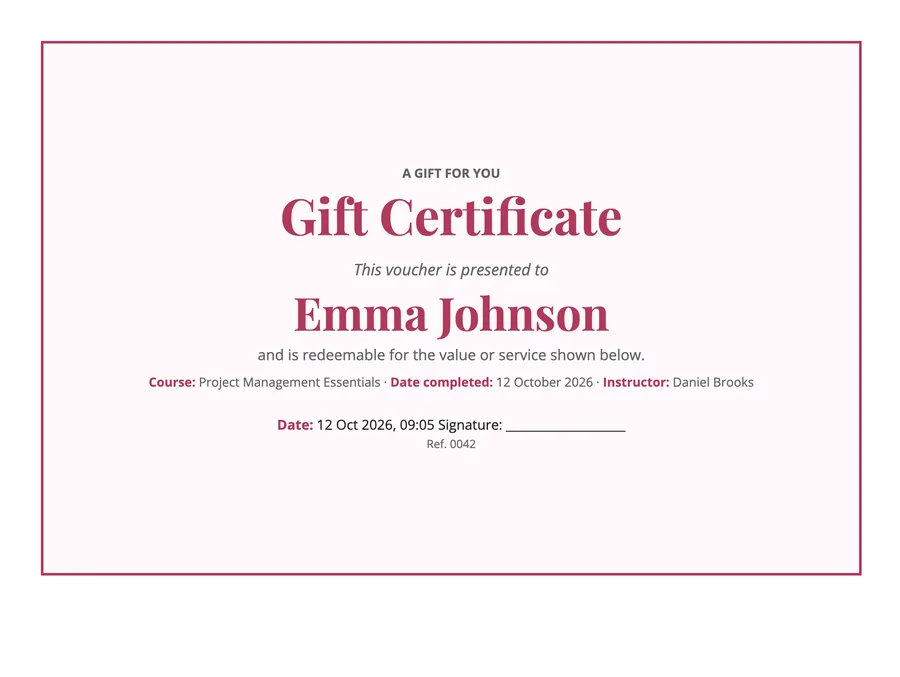
A pale pink page with a rose frame, the words 'A gift for you' and 'This voucher is presented to' above the recipient name. The line 'and is redeemable for the value or service shown below' leads into the value, expiry date and your other answers, then a date, a signature line and a reference number.
Set it up in three steps
- Install the add-on. Add FairSign Forms to PDF to Google Forms from the Google Workspace Marketplace. It is free to install.
- Pick this template. Open your form, click the puzzle-piece icon (or the three-dot menu, then Add-ons), and open FairSign Forms to PDF. In step 1, choose Gift Certificate from the template library. It opens as a Google Doc in your Drive.
- Turn on sending. Tell the add-on which question holds the email address, send a test to yourself, then switch on automatic sending. Each new response is turned into a PDF and emailed to the person.
Tips for the Gift Certificate
- Collect payment first. The form and the PDF do not handle money, so send the form link only after you have been paid, or check payments before you share it.
- Ask for an expiry date and say whether the voucher is refundable. Rules differ between countries, so check the local ones.
- Add your terms to the Google Doc, such as 'Please book ahead'. The line sits under the details on every voucher.
Questions people ask
Can customers pay through the form?
No. FairSign does not collect payments. Take payment however you do today, then use the form to create the voucher.
How do I stop someone redeeming it twice?
Each PDF has a reference number. Keep a list of numbers you have accepted, and cross them off when a voucher is used.
Can I edit the Gift Certificate before I use it?
Yes. Choosing it in the add-on creates a Google Doc in your Drive. Change the wording, fonts or colours, add a logo, and keep the {{placeholders}} in double braces where answers should appear.