When to use the Workshop Certificate
Workshop leaders, bootcamp coaches and masterclass hosts use this certificate to give every participant something to take home. It reads 'Certificate of Workshop Completion' and has a bold side bar, so it feels lively rather than stiff. It works for a one-day pottery class, a coding bootcamp, a language intensive or a leadership masterclass.
Questions to ask in your form
Create these questions in your Google Form. The PDF is built from the questions you ask, so rename, add or drop any of them.
- Full name Short answerAppears large under the heading.
- Email address Short answerThe PDF is sent here.
- Workshop title Short answerThe name of the session or series.
- Date DateStart date, or the day it was held.
- Facilitator Short answerOptional. Your name or your team.
- Skills covered ParagraphOptional. A short list is fine.
What the PDF contains
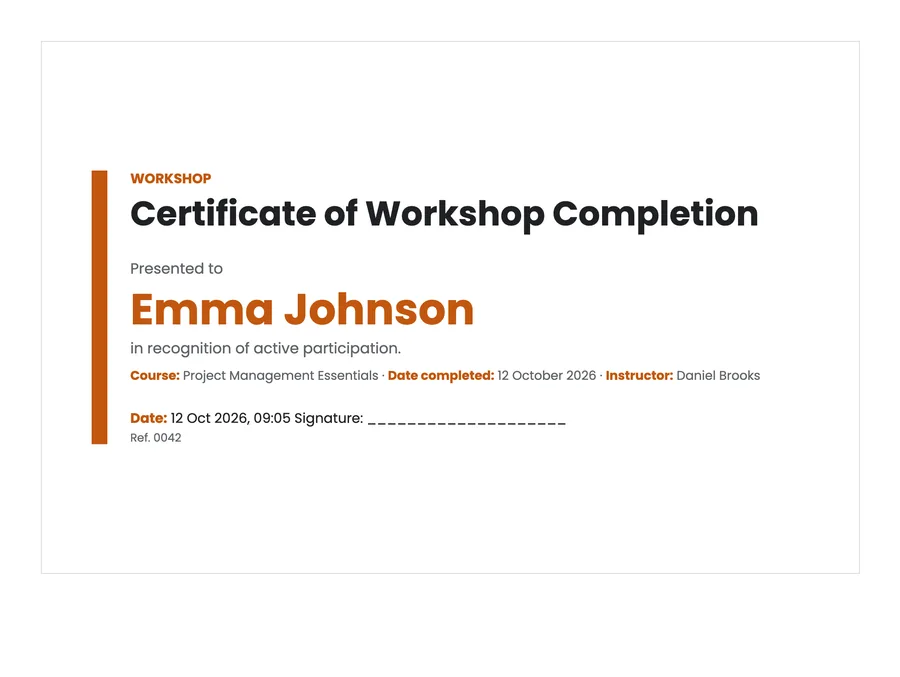
A white page with an orange bar down the left side, the word 'Workshop' and the title 'Certificate of Workshop Completion'. 'Presented to' leads into the name, followed by 'in recognition of active participation'. Your answers, a date, a signature line and a reference number finish the page.
Set it up in three steps
- Install the add-on. Add FairSign Forms to PDF to Google Forms from the Google Workspace Marketplace. It is free to install.
- Pick this template. Open your form, click the puzzle-piece icon (or the three-dot menu, then Add-ons), and open FairSign Forms to PDF. In step 1, choose Workshop Certificate from the template library. It opens as a Google Doc in your Drive.
- Turn on sending. Tell the add-on which question holds the email address, send a test to yourself, then switch on automatic sending. Each new response is turned into a PDF and emailed to the person.
Tips for the Workshop Certificate
- A 'Skills covered' question makes the certificate more useful to the learner, who can add it to a CV or portfolio.
- Run a short feedback form first and finish with the certificate request. People complete both when the reward is clear.
- The side bar is solid colour, so print one test page on your office printer before a big batch.
- If your workshop has levels, add a question for the level reached. It turns a plain participation record into something a learner can show to the next teacher.
Questions people ask
Is it good for kids workshops?
Yes. The bright side bar works well for children. Ask a parent or guardian to enter an email address.
Can I make a version in my brand colour?
Open the Google Doc and change the bar and heading colours. The add-on keeps your edits.
Can I edit the Workshop Certificate before I use it?
Yes. Choosing it in the add-on creates a Google Doc in your Drive. Change the wording, fonts or colours, add a logo, and keep the {{placeholders}} in double braces where answers should appear.