When to use the Incident Report
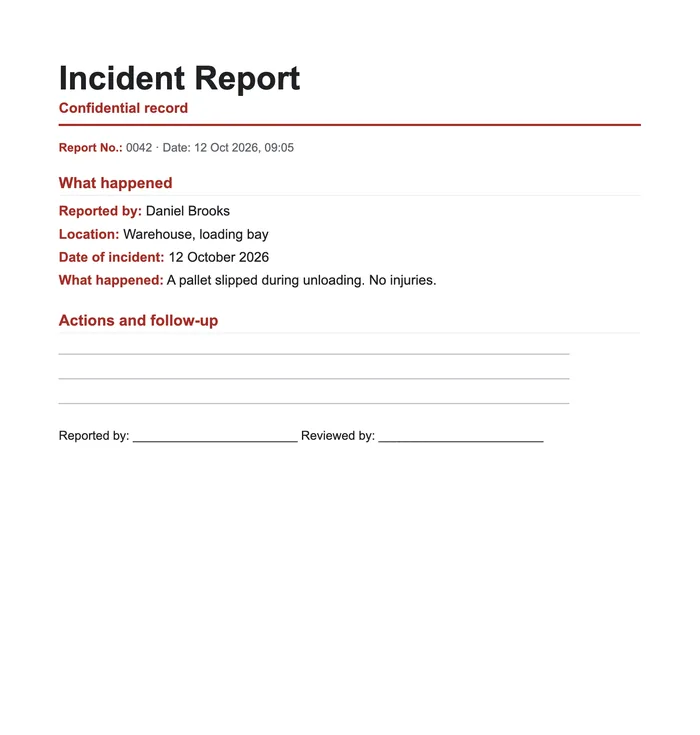
An incident report records what happened when something goes wrong or nearly does: a slip in a warehouse, a near miss on a ladder, a customer complaint on site. Facilities managers, schools, sports clubs, care providers and small workshops use it so details are written down while memories are fresh. The page is plain, with a red heading and a confidential marking, and leaves room to write actions and follow-up by hand.
Questions to ask in your form
Create these questions in your Google Form. The PDF is built from the questions you ask, so rename, add or drop any of them.
- Reported by Short answerName of the person filing.
- Your email Short answerWhere the copy is sent.
- Location Short answerFor example 'Warehouse, loading bay'.
- Date and time of incident Short answerOr use separate Date and Time questions.
- What happened ParagraphFacts only. Who, what and where.
- Was anyone hurt? Multiple choiceYes, no, unsure.
What the PDF contains
A page headed 'Incident Report' with 'Confidential record' in red and a report number. Under 'What happened', each answer is a label and value line. Under 'Actions and follow-up' are blank ruled lines for notes, and at the bottom are blank lines for 'Reported by' and 'Reviewed by'.
Set it up in three steps
- Install the add-on. Add FairSign Forms to PDF to Google Forms from the Google Workspace Marketplace. It is free to install.
- Pick this template. Open your form, click the puzzle-piece icon (or the three-dot menu, then Add-ons), and open FairSign Forms to PDF. In step 1, choose Incident Report from the template library. It opens as a Google Doc in your Drive.
- Turn on sending. Tell the add-on which question holds the email address, send a test to yourself, then switch on automatic sending. Each new response is turned into a PDF and emailed to the person.
Tips for the Incident Report
- Ask for facts, not blame. 'A pallet slipped during unloading' is more useful than 'Dan was careless'.
- Keep the response sheet private. It can hold names and injuries, so share it with as few people as possible.
- In many places serious incidents have reporting duties. This form is not a substitute for them, so check what applies to you.
Note. This template is not legal or safety advice. Reporting rules for incidents, injuries and data protection differ by country and industry. Check the rules that apply to you.
Questions people ask
Can I add photos?
The PDF shows form answers, not images. Ask for a link to a shared folder with photos.
Is it a legal record?
It is a written record of what the person reported. Whether it is enough for legal or insurance purposes depends on your situation.
Can I edit the Incident Report before I use it?
Yes. Choosing it in the add-on creates a Google Doc in your Drive. Change the wording, fonts or colours, add a logo, and keep the {{placeholders}} in double braces where answers should appear.