When to use the Inspection Checklist
An inspection checklist records the result for each item on a list, such as fire exits clear, extinguishers in date, first-aid kit stocked. Caretakers, school staff, landlords, gym managers and site supervisors use one for their rounds. In a form, each check is a question, and the PDF turns the answers into a neat table with a blank initials column. Pick a pass, fail or n/a style for each question so the results line up.
Questions to ask in your form
Create these questions in your Google Form. The PDF is built from the questions you ask, so rename, add or drop any of them.
- Fire exits clear Multiple choicePass, needs action, not applicable.
- Extinguishers in date Multiple choiceUse the same options for every check.
- First-aid kit stocked Multiple choiceAdd a note box if something needs fixing.
- Lighting Multiple choiceOne question per line of your checklist.
- Notes on anything that failed ParagraphOptional but useful.
- Inspector name Short answerWho carried out the check.
What the PDF contains
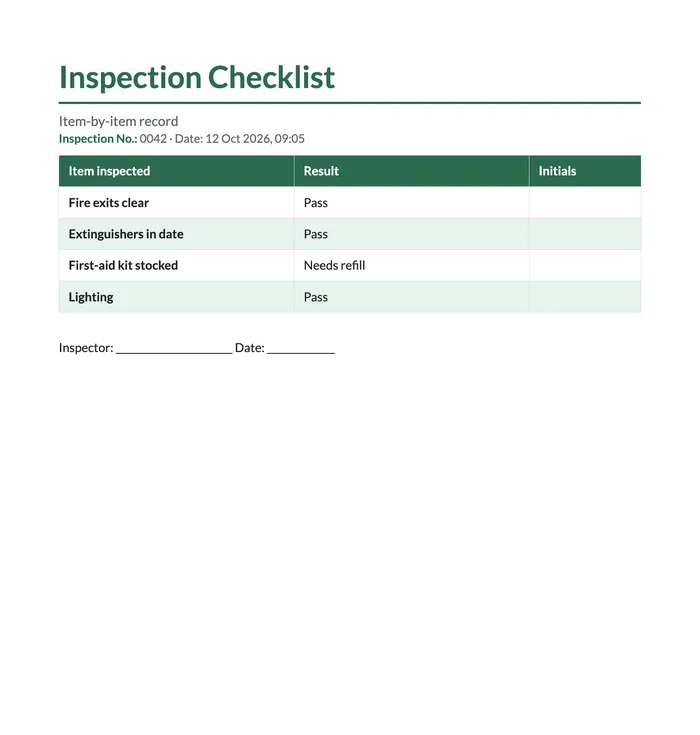
A page headed 'Inspection Checklist' with 'Item-by-item record' and an inspection number. A green-headed table lists each question under 'Item inspected', the answer under 'Result', and a blank 'Initials' column. The page closes with blank lines for the inspector's signature and the date.
Set it up in three steps
- Install the add-on. Add FairSign Forms to PDF to Google Forms from the Google Workspace Marketplace. It is free to install.
- Pick this template. Open your form, click the puzzle-piece icon (or the three-dot menu, then Add-ons), and open FairSign Forms to PDF. In step 1, choose Inspection Checklist from the template library. It opens as a Google Doc in your Drive.
- Turn on sending. Tell the add-on which question holds the email address, send a test to yourself, then switch on automatic sending. Each new response is turned into a PDF and emailed to the person.
Tips for the Inspection Checklist
- Make every check a required multiple-choice question with the same options. Free text makes it hard to spot failures.
- Keep the list short enough to finish on a phone while walking around. Ten to fifteen items is plenty for one round.
- A failed item should lead to action. Put a 'what needs to happen' question after the checks so nothing gets lost.
Note. This template is not legal or safety advice. A checklist records what the inspector entered. Regulations about inspections differ by country and industry, so follow the ones that apply to you.
Questions people ask
Can I use it for food safety checks?
You can record checks with it. It does not know your food safety rules, so follow the scheme that applies to you.
Does it highlight failures?
No. Results print as typed. Use clear words such as 'Needs action'.
Can I edit the Inspection Checklist before I use it?
Yes. Choosing it in the add-on creates a Google Doc in your Drive. Change the wording, fonts or colours, add a logo, and keep the {{placeholders}} in double braces where answers should appear.