When to use the Maintenance Request
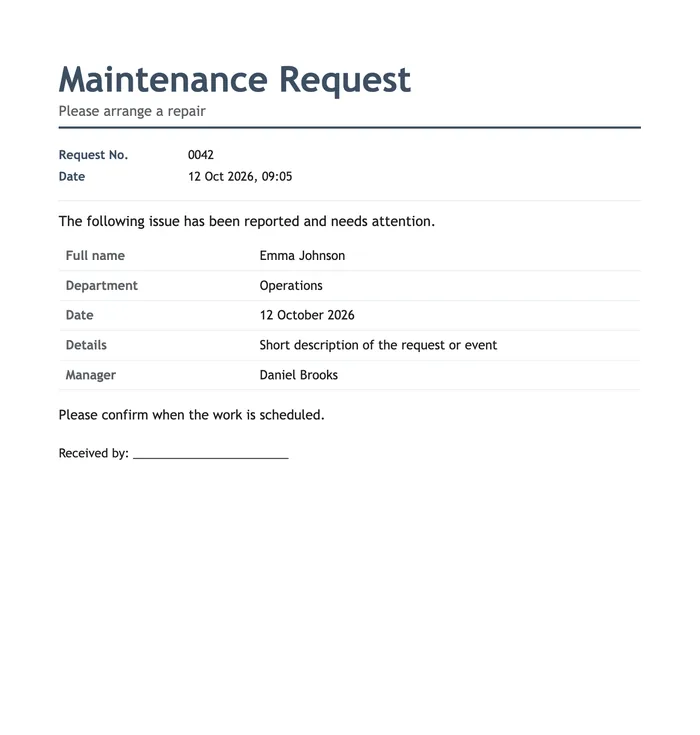
A maintenance request tells whoever looks after a building or a piece of equipment that something is broken. Landlords, caretakers, office managers, clubs and schools use one so repair requests arrive in a standard format with a location and a description. The page is a memo, with the heading 'Maintenance Request' and a line asking you to confirm when the work is scheduled. It suits both a residential and an office setting.
Questions to ask in your form
Create these questions in your Google Form. The PDF is built from the questions you ask, so rename, add or drop any of them.
- Your name Short answerFirst row.
- Your email Short answerWhere the reporter's copy is sent.
- Location Short answerBuilding, flat or room number.
- What needs fixing ParagraphDescribe the fault.
- Urgency Multiple choiceFor example 'Safety risk', 'This week', 'When convenient'.
- Best time for access Short answerOptional.
What the PDF contains
A slate memo-style page headed 'Maintenance Request' with 'Please arrange a repair'. A request number and date sit under it. The intro says 'The following issue has been reported and needs attention.' A list shows every answer. The page ends with 'Please confirm when the work is scheduled.' and a blank 'Received by' line.
Set it up in three steps
- Install the add-on. Add FairSign Forms to PDF to Google Forms from the Google Workspace Marketplace. It is free to install.
- Pick this template. Open your form, click the puzzle-piece icon (or the three-dot menu, then Add-ons), and open FairSign Forms to PDF. In step 1, choose Maintenance Request from the template library. It opens as a Google Doc in your Drive.
- Turn on sending. Tell the add-on which question holds the email address, send a test to yourself, then switch on automatic sending. Each new response is turned into a PDF and emailed to the person.
Tips for the Maintenance Request
- Offer an 'urgent safety risk' option and say in the form what to do first, such as calling a phone number. A form is not an emergency line.
- Ask for a location in a fixed format, such as 'Flat 4B, kitchen', so the repairer can find it.
- Give the PDF to the person fixing it, not only to the reporter. Choose their email as the recipient, or forward the copy.
Note. This template is not legal or HR advice. Employment, safety and data protection rules differ by country. Check what applies to you.
Questions people ask
Can tenants attach photos?
Not in the PDF. Ask for a link to a photo, or invite them to reply by email with pictures.
Does it send a reply to the tenant?
It sends the PDF of their request, so they have a record. A reply from you is separate.
Can I edit the Maintenance Request before I use it?
Yes. Choosing it in the add-on creates a Google Doc in your Drive. Change the wording, fonts or colours, add a logo, and keep the {{placeholders}} in double braces where answers should appear.