When to use the Onboarding Checklist
An onboarding checklist records what has been provided to a new employee or volunteer and what is still to do: a laptop, an email account, a safety induction, a key card. Small companies, clinics, schools and clubs use it to make sure nothing is missed on a first week. A form lets the manager tick things off by answering questions, and the PDF goes into the personnel file. It is a record of the process, not a contract.
Questions to ask in your form
Create these questions in your Google Form. The PDF is built from the questions you ask, so rename, add or drop any of them.
- New starter name Short answerFirst row of the table.
- Manager email Short answerChoose it as the recipient to send the checklist to the manager.
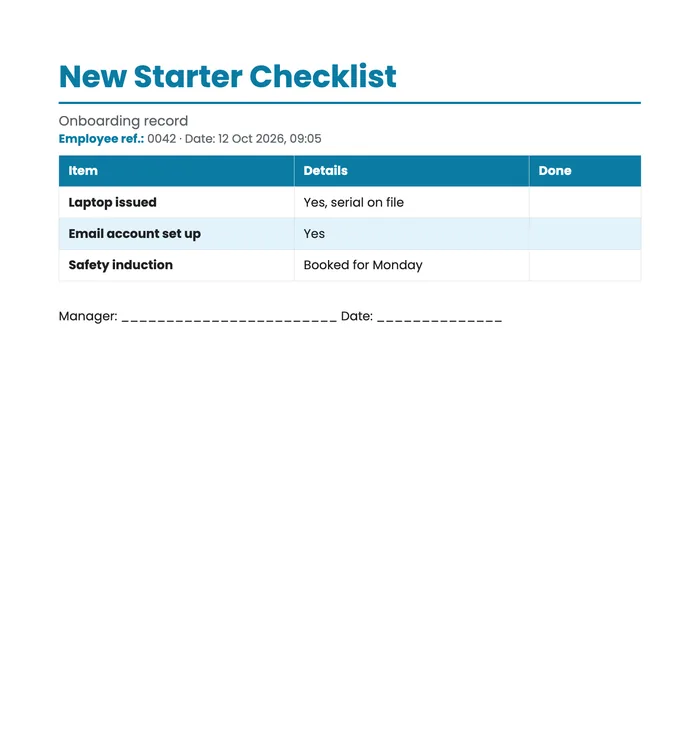
- Laptop issued Multiple choiceYes, no or not needed. The answer fills the Details column.
- Email account set up Multiple choiceYes or no.
- Safety induction DropdownDone, booked for a date, not needed.
- Start date DateOptional.
What the PDF contains
A teal page headed 'New Starter Checklist' with 'Onboarding record' and an employee reference. A table with a coloured header lists each item with its details and a blank 'Done' column. Underneath are blank lines for the manager's signature and the date.
Set it up in three steps
- Install the add-on. Add FairSign Forms to PDF to Google Forms from the Google Workspace Marketplace. It is free to install.
- Pick this template. Open your form, click the puzzle-piece icon (or the three-dot menu, then Add-ons), and open FairSign Forms to PDF. In step 1, choose Onboarding Checklist from the template library. It opens as a Google Doc in your Drive.
- Turn on sending. Tell the add-on which question holds the email address, send a test to yourself, then switch on automatic sending. Each new response is turned into a PDF and emailed to the person.
Tips for the Onboarding Checklist
- Write the questions as the items on your list. One question per item makes the table read like a checklist.
- Use a dropdown such as 'Done' or 'Booked for Monday', so you see what still needs attention at a glance.
- Personnel data is private. Keep the response sheet and the Drive folder restricted to the people who need them.
Note. This template is not legal or HR advice. Employment, safety and data protection rules differ by country. Check what applies to you.
Questions people ask
Does it track what is left?
It shows answers at the moment the form was sent. Track open items by resubmitting or in a sheet.
Can I use it for volunteers?
Yes. Rename the items to match what a volunteer receives.
Can I edit the Onboarding Checklist before I use it?
Yes. Choosing it in the add-on creates a Google Doc in your Drive. Change the wording, fonts or colours, add a logo, and keep the {{placeholders}} in double braces where answers should appear.