When to use the Interview Confirmation
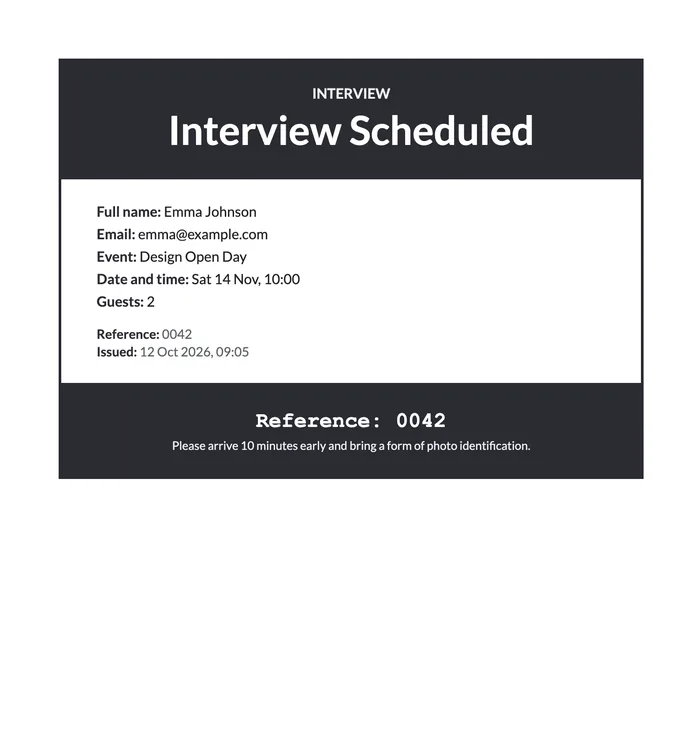
An interview confirmation tells a candidate when and where to turn up. Recruiters, small employers, university admissions teams and scholarship committees use it. It has a dark ticket style with the reference in a bar at the bottom, and a line that asks candidates to arrive early and bring photo identification. A form that lets people choose a slot can produce this confirmation at once, and you keep the details in one sheet.
Questions to ask in your form
Create these questions in your Google Form. The PDF is built from the questions you ask, so rename, add or drop any of them.
- Candidate name Short answerFirst row.
- Email address Short answerWhere the confirmation is sent.
- Role or programme Short answerWhat the interview is for.
- Interview slot DropdownDate and time, one option per free slot.
- Format Multiple choiceIn person or video call.
- Accessibility needs ParagraphOptional.
What the PDF contains
A charcoal banner with the label 'Interview' and the title 'Interview Scheduled'. Every answer is a label and value line, followed by a reference and an issue time. A dark strip at the bottom shows the reference and the note 'Please arrive 10 minutes early and bring a form of photo identification.'
Set it up in three steps
- Install the add-on. Add FairSign Forms to PDF to Google Forms from the Google Workspace Marketplace. It is free to install.
- Pick this template. Open your form, click the puzzle-piece icon (or the three-dot menu, then Add-ons), and open FairSign Forms to PDF. In step 1, choose Interview Confirmation from the template library. It opens as a Google Doc in your Drive.
- Turn on sending. Tell the add-on which question holds the email address, send a test to yourself, then switch on automatic sending. Each new response is turned into a PDF and emailed to the person.
Tips for the Interview Confirmation
- The arrival note assumes an in-person interview. For video calls, edit it to say 'join five minutes early' and paste the link.
- Remove a slot from the dropdown once it is taken. Google Forms does not do this on its own for simple dropdowns.
- Keep the form short. A candidate who is already stressed should only enter what you cannot know.
- Send the confirmation straight after a slot is chosen, and send a second message with directions or a video link closer to the day.
Questions people ask
Does it send a calendar invite?
No. Send an invite yourself if you want the slot in their calendar.
Can it say where to go?
Yes. Write the address in the Google Doc, or add a Location question.
Can I edit the Interview Confirmation before I use it?
Yes. Choosing it in the add-on creates a Google Doc in your Drive. Change the wording, fonts or colours, add a logo, and keep the {{placeholders}} in double braces where answers should appear.