When to use the Job Application Summary
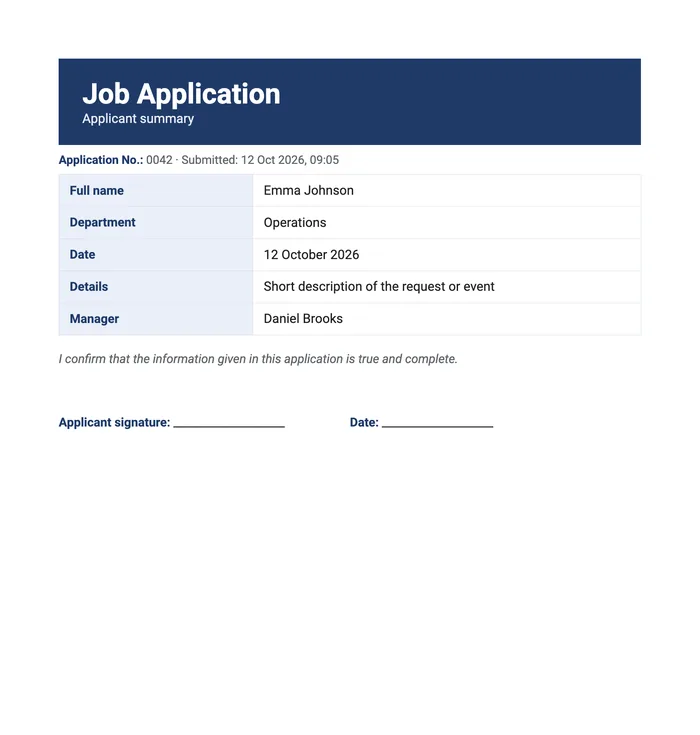
A job application summary turns each applicant's form answers into a single page that you can read, share and file. Recruiters, small teams, volunteer coordinators and community groups use it so that hiring managers do not have to open a spreadsheet to compare people. The navy banner reads 'Job Application', with a table of answers and a declaration at the bottom. It records what the applicant told you, and nothing more.
Questions to ask in your form
Create these questions in your Google Form. The PDF is built from the questions you ask, so rename, add or drop any of them.
- Full name Short answerFirst row of the table.
- Email address Short answerWhere the applicant's copy is sent.
- Position applied for DropdownOne option per open role.
- Current role and employer Short answerOptional.
- Why are you a good fit? ParagraphKeep the limit to a few sentences.
- Earliest start date DateHelps with planning.
What the PDF contains
A navy banner reading 'Job Application' with 'Applicant summary' under it, and an application number with the submission time. A table with shaded labels lists every answer. Below it the declaration 'I confirm that the information given in this application is true and complete.' is followed by blank lines for the applicant's signature and the date.
Set it up in three steps
- Install the add-on. Add FairSign Forms to PDF to Google Forms from the Google Workspace Marketplace. It is free to install.
- Pick this template. Open your form, click the puzzle-piece icon (or the three-dot menu, then Add-ons), and open FairSign Forms to PDF. In step 1, choose Job Application Summary from the template library. It opens as a Google Doc in your Drive.
- Turn on sending. Tell the add-on which question holds the email address, send a test to yourself, then switch on automatic sending. Each new response is turned into a PDF and emailed to the person.
Tips for the Job Application Summary
- Only ask what you will use in the decision. Every extra field is personal data you must look after.
- Do not ask for details that could lead to unfair treatment, such as age, marital status or health, unless a law or the role truly requires it. Check your local rules.
- Send the PDF to the applicant too. It confirms receipt and lets them see what you hold about them.
Note. This template is not legal or HR advice. Employment, safety and data protection rules differ by country. Check what applies to you.
Questions people ask
Does it attach a CV?
No. The page shows the form answers. Ask for a link to a CV or a portfolio.
Is the declaration a signature?
The declaration is text and the signature line is blank. Printed and signed, it is a pen signature. The form itself does not collect one.
Can I edit the Job Application Summary before I use it?
Yes. Choosing it in the add-on creates a Google Doc in your Drive. Change the wording, fonts or colours, add a logo, and keep the {{placeholders}} in double braces where answers should appear.