When to use the Volunteer Recognition
A volunteer recognition certificate thanks people and gives them a record of time given. Charities, schools, food banks and sports clubs use it at the end of a season. Students use the hours when they apply for scholarships or for work. Collecting hours through a form gives the volunteer a clear, printable summary and spares the coordinator a pile of manual letters.
Questions to ask in your form
Create these questions in your Google Form. The PDF is built from the questions you ask, so rename, add or drop any of them.
- Volunteer full name Short answerShown large under the heading.
- Email address Short answerWhere the certificate is sent.
- Role or activity Short answerFor example 'Kitchen helper'.
- Total hours Short answerA number. Shown with the other details.
- Dates volunteered Short answerFor example 'March to June 2027'.
- Coordinator name Short answerOptional. Who can confirm the hours.
What the PDF contains
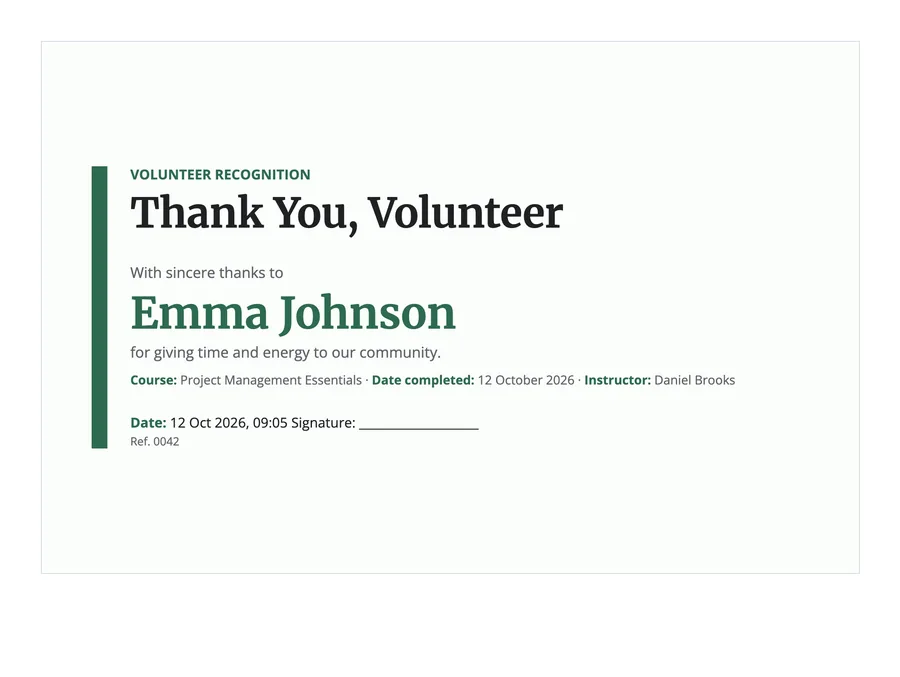
A white page with a green bar down the left side, the words 'Volunteer recognition' and the heading 'Thank you, volunteer'. 'With sincere thanks to' sits above the name, followed by 'for giving time and energy to our community'. Hours, role and dates appear underneath, then a date, a signature line and a reference number.
Set it up in three steps
- Install the add-on. Add FairSign Forms to PDF to Google Forms from the Google Workspace Marketplace. It is free to install.
- Pick this template. Open your form, click the puzzle-piece icon (or the three-dot menu, then Add-ons), and open FairSign Forms to PDF. In step 1, choose Volunteer Recognition from the template library. It opens as a Google Doc in your Drive.
- Turn on sending. Tell the add-on which question holds the email address, send a test to yourself, then switch on automatic sending. Each new response is turned into a PDF and emailed to the person.
Tips for the Volunteer Recognition
- Hours are self-reported on a form. If a record matters to you, have the coordinator check the number before sending the PDF.
- Ask for hours as digits only. It keeps the line tidy and makes the data easy to add up in the response sheet.
- Add the registered charity number or school name to the Doc if you want the certificate to carry it.
Questions people ask
Can students use it for school credit?
That depends on the school. The certificate records what the form says. Some schools want a signature from the coordinator, so print it and sign it.
Can I thank a whole group?
Yes, but a separate response for each person gives each certificate a single name.
Can I edit the Volunteer Recognition before I use it?
Yes. Choosing it in the add-on creates a Google Doc in your Drive. Change the wording, fonts or colours, add a logo, and keep the {{placeholders}} in double braces where answers should appear.